
Option Signals -Picker Alerter
Gamma Greeks: AI Stock Option Signals, Flow AlertsFinance
4.3242.00 Reviews
- Version
- 3.3.11
- Installs
- 1.00M
- Age Rating
- Everyone
Screenshots
Our Review of Option Signals -Picker Alerter
 Analysis by Appyee
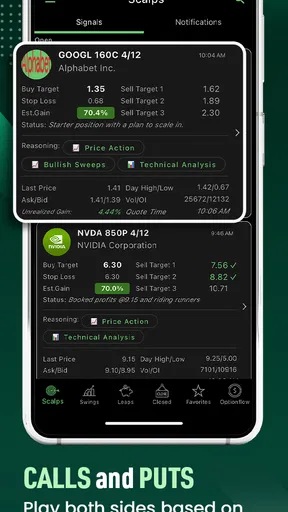
When I look at an options signal app, I start with one practical question: does it help me notice a possible trade without pretending to make the decision for me? Option Signals - Picker Alerter is built around alerts for calls and puts that respond to market trends. That focus can be useful when I want a prompt to investigate, but I would treat every signal as a starting point for research, not an instruction to buy or sell.
What a real-time signal changes
Options move quickly, and keeping a chart open all day is not realistic for many people. An alert can bring a potential setup to my attention while I am doing something else. The benefit is not that it guarantees I catch a profitable move; it is that I can decide whether a notification deserves a closer look rather than constantly checking the market.
That distinction matters especially with calls and puts. A signal based on a broad market trend may not account for every factor that affects a particular contract, such as its strike, expiration, volatility, or the amount I am willing to risk. I would use the alert to frame a question—what changed, and does this fit my plan?—then verify the details in a brokerage or charting tool before placing a trade.
Turning an alert into a sensible routine
I would begin by deciding what kind of opportunity I actually want to hear about. If every notification feels urgent, the app can become noise instead of help. Keeping alerts aligned with a narrow strategy makes it easier to review each one calmly and to ignore a signal that does not match my time horizon or risk limits.
A useful habit is to record why I acted on an alert—or why I passed—alongside the market conditions I saw at the time. Over several sessions, that simple note-taking can show whether the signals help me focus or merely encourage impulsive decisions. It also separates the app’s role as a prompt from my own responsibility for sizing, timing, and managing a position.
For example, imagine I am away from my desk during a busy workday and receive a call or put alert. I would not place a trade while distracted just because it arrived in real time. I would check whether the market context still supports the idea when I can focus, compare the contract with my rules, and pass if the opportunity has already moved or the risk is unclear. The alert is most useful when it creates a moment to review, not pressure to act.
How it differs from watching charts alone
Compared with manually scanning charts, alerts can save attention by bringing selected market activity to me. That is a meaningful convenience for someone who has a plan but cannot monitor prices continuously. A charting app remains better when I want to inspect price action directly, while a brokerage platform is the place to verify a contract and handle an order. I see this app as a possible companion to those tools, not a replacement for them.
It also differs from general finance news. Headlines explain events and broader context, while a signal is intended to point toward a possible options-trading action. Neither approach is enough by itself: news can be too broad for a specific contract, and a signal can lack the context I need to judge whether a trade suits me. Using both thoughtfully may help me ask better questions, but it does not remove the need for independent checks.
Costs, uncertainty, and the right level of trust
The app is free to download, with in-app purchases ranging from $11.99 to $299.99 per item. I would check what an optional purchase offers and whether it matches how often I trade before paying. Someone still learning the basics may get more value from practicing a consistent review process than from spending more in search of a shortcut.
Signals can be wrong, arrive after a move has begun, or simply fail to suit a particular trader’s plan. Options can also expose users to substantial losses, so I would not treat an alert as personalized financial advice or risk money I cannot afford to lose. The safest use is selective: pause, verify the setup elsewhere, and be comfortable doing nothing when the reasoning is weak.
Who is likely to get the most from it
I can see the appeal for an options trader who already understands calls and puts, has clear entry and exit rules, and wants a prompt to investigate market movement. It may also suit a busy person who prefers reviewing a handful of relevant alerts over keeping charts in view all day. Beginners can use it as a reason to learn how signals relate to market conditions, but should avoid copying them without understanding the trade.
It is less suitable for anyone seeking guaranteed outcomes, automatic decision-making, or a full substitute for brokerage and charting tools. If I were only looking for long-term investing ideas or basic market news, I would choose an app designed around those needs instead. A focused options alert tool makes sense only when options trading itself is part of my approach.
Have you ever found yourself tangled in the world of financial trading, wishing for a little guidance? That's where Option Signals - Picker Alerter steps in. It's like having a savvy friend whispering market trends into your ear, ensuring you're always in the know.
Diving into the Features
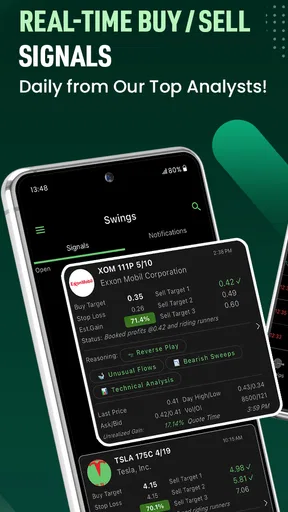
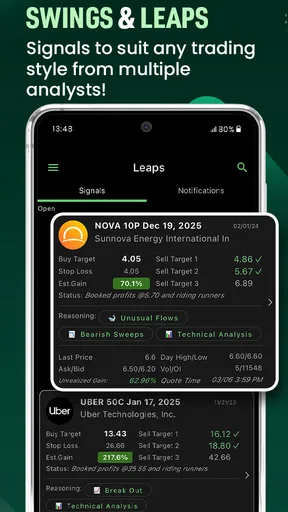
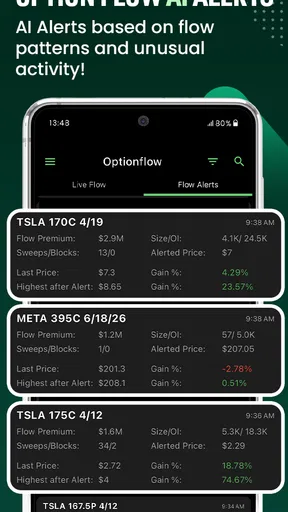
First off, let's talk about what makes Option Signals - Picker Alerter tick. The app is designed to provide real-time signals and alerts, helping you make informed decisions in the fast-paced world of options trading. Whether you're a newbie or a seasoned pro, this app aims to be your trusty sidekick.
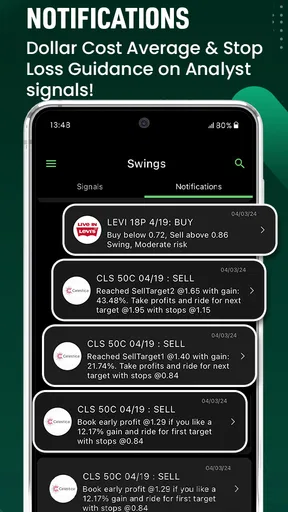
One of the standout features is the instant notifications. The app sends you alerts as soon as there's a significant market movement. It's like having a personal assistant who never sleeps, constantly keeping an eye on the market for you. This feature is especially handy if you want to jump on opportunities as soon as they arise.
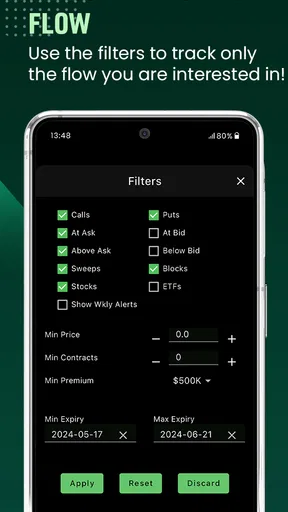
Then there's the customizable alerts. Not everyone trades the same way, and the app recognizes that. You can set your own parameters, ensuring the notifications you receive align perfectly with your trading strategy. It's all about tailoring the experience to fit your needs.
User Experience and Interface
Now, onto the interface. The app is designed with simplicity in mind, sporting a clean and intuitive layout. Navigating through the app is a breeze, even for those who might not be the most tech-savvy. All the features are neatly categorized, making it easy to find what you need without any hassle.
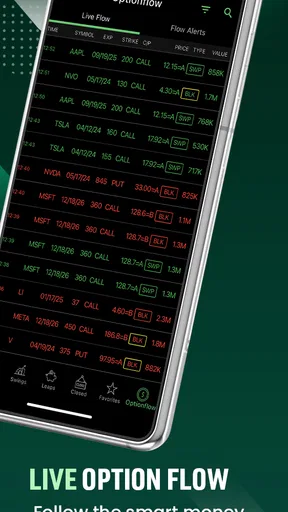
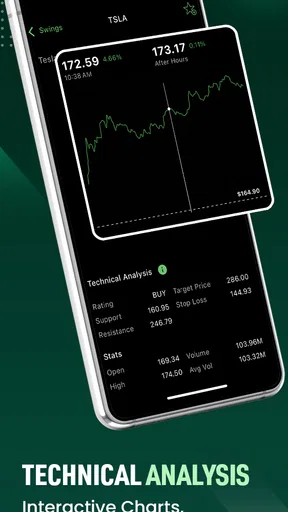
The app also provides detailed insights and analytics. For those of you who love diving deep into data, this feature will be a treat. You can access detailed charts and statistics, allowing you to analyze past trades and strategize for the future. It's like having a crystal ball, minus the mystical aura.
The Community Aspect
Another cool aspect is the community feature. Trading can sometimes feel like a solitary endeavor, but with this app, you can connect with other users. Share insights, discuss strategies, or simply chat about the latest market trends. It's like having a virtual trading club in your pocket.
For those who enjoy a bit of education, the app includes an informative section with articles and tutorials. Whether you're brushing up on your trading skills or learning something new, there's plenty of content to keep you engaged and informed.
Compatibility and Accessibility
Speaking of accessibility, the app is available on both Android and iOS platforms, ensuring that you can take your trading signals with you wherever you go. The download and installation process is straightforward, and you'll be up and running in no time.
Moreover, the app is lightweight and doesn't hog your device's resources, so you won't have to worry about it slowing down your phone. Plus, it's designed to work seamlessly even on older devices, making it accessible to a wide range of users.
Why You Might Love It
If you're someone who's passionate about trading and wants to stay ahead of the game, this app could be a game-changer. Its real-time alerts and customizable features make it a versatile tool for any trader. Plus, the community aspect adds a social element that can make your trading journey less lonely and more interactive.
The educational resources are a nice touch, too. Whether you're starting from scratch or looking to refine your skills, there's something for everyone. It's like having a trading mentor on standby, ready to offer guidance whenever you need it.
In summary, Option Signals - Picker Alerter offers a comprehensive package for traders of all levels. Its combination of real-time alerts, user-friendly interface, and community features make it a standout choice in the world of trading apps. So, if you're looking to elevate your trading game, this app might just be the perfect companion.
Ready to dive into the world of trading with confidence? You might want to give Option Signals - Picker Alerter a try. Who knows, it could become your new favorite tool in navigating the financial markets.
Fit, platform, and a quick way to evaluate it
For a first trial, I would set aside a short, ordinary stretch of time rather than install the app and immediately reorganize my trading around it. Decide what a useful alert would look like before notifications begin to shape your attention. Then compare the alerts you receive with your own market notes and the checks you normally make. This gives you a practical way to judge whether the app adds a helpful prompt or simply repeats activity you already watch elsewhere.
The app is in the finance category and is developed by Gamma Greeks: AI Stock Option Signals, Flow Alerts. It is free to download, has an average rating of 4.3 from around 9.5 thousand ratings, and has been installed over a million times. Its Everyone age rating describes its store classification, not the risk level of options trading; I would still approach the subject with care and make sure I understand the potential losses before using signals to guide real decisions.
On Android, the current version is 3.3.3, and the stated minimum operating-system requirement is 7.1. The app was released on September 18, 2021. Those details are useful when checking basic compatibility, but the more important question for me is whether its alert workflow fits the way I already review trades. A broad install base may make it easier to find other users’ perspectives, yet popularity alone does not show that a signal suits my strategy.
Small workflow choices that make alerts more useful
I would avoid treating each notification as a separate invitation to trade. Instead, I would group review into a deliberate routine: read the alert, note the market context, and check the idea against the rules I set before the session. If it does not pass those checks, I would close it without trying to justify a trade after the fact. That approach reduces the chance that a stream of prompts quietly changes a careful plan into reactive trading.
Another useful test is to review alerts that I did not act on. If I only study the trades I took, I can easily mistake a lucky outcome for proof that the signal was reliable. Recording a brief reason for passing—such as a mismatch with my time horizon or an unclear contract choice—helps me judge whether the app is surfacing ideas that genuinely deserve attention. This is a low-effort way to learn from the tool without assuming it has predictive certainty.
I would also decide in advance when not to respond. If I am commuting, in a meeting, or unable to check a contract carefully, an alert can wait. A real-time prompt has little value if it pushes me to make a rushed decision on a small screen. For a trader who cannot reliably pause and verify, fewer notifications or a slower, scheduled review method may be a better fit than trying to react immediately.
Questions worth settling before relying on it
A natural question is whether the signals can be used without paying. The app is free to download, while optional in-app purchases range from $11.99 to $299.99 per item. I would first use the free experience to understand whether alerts fit my routine, then examine any paid option carefully before committing. The presence of a purchase does not by itself tell me that it improves results, so I would compare its practical value with the tools I already use.
Another question is whether an alert can replace checking a trade elsewhere. I would not use it that way. A notification can bring an idea forward, but I would still verify the relevant market conditions and contract details through tools suited to that task before placing an order. Likewise, I would not assume that an alert is tailored to my finances, experience, or tolerance for loss. It is a prompt to investigate, not a personal plan.
People also often want to know whether this is a sensible first step for a complete beginner. It can introduce the habit of paying attention to calls, puts, and market movement, but it cannot make those concepts safe by itself. I would learn the mechanics of options and practice evaluating risk before acting on live signals. Someone who is not ready to do that may be better served by basic investing education or a paper-trading routine than by notifications that can feel time-sensitive.
With that in mind, I would describe Option Signals - Picker Alerter as a focused assistant for people who already have a process and want another source of prompts to examine. Its appeal is the chance to notice a possible options setup without watching charts every minute; its limit is that the alert cannot do the trader’s verification or risk management. If I can keep that boundary clear, it may earn a place alongside my other market tools. If I want certainty, hands-off trading, or a substitute for learning how options work, I would skip it.
Verdict
Strengths of Option Signals -Picker Alerter
- User-friendly interface for quick navigation.
- Real-time alerts for timely decision-making.
- Customizable settings for personalized alerts.
- Comprehensive analytics for in-depth insights.
- Supports multiple trading platforms.
Limitations of Option Signals -Picker Alerter
- Requires a stable internet connection.
- Limited free features; premium is costly.
- Notifications can be overwhelming.
- Some users report occasional bugs.
- Limited customer support hours.
Other Releases by Gamma Greeks: AI Stock Option Signals, Flow Alerts
View All
Options Alerts - Swing Signals
Finance4.3

Trade Signals - Stocks Options
Finance4.5
Similar Picks in This Category
View All
Google Wallet
Google LLC4.3

Airtel: Recharge, Bank & Loans
Airtel4.0

PayPal - Pay, Send, Save
PayPal Mobile4.2

DANA Indonesia Digital Wallet
PT Espay Debit Indonesia Koe4.5

Binance: Buy Bitcoin & Crypto
Binance Inc.4.8

Cash App
Block, Inc.4.7
Frequently Asked Questions
What is Option Signals - Picker Alerter, and how does it work?
Option Signals - Picker Alerter is an app designed to provide users with real-time alerts and signals for stock options trading. It analyzes market data to generate actionable insights, helping users make informed trading decisions. The app offers customizable alerts to suit various trading strategies and user preferences.
Is Option Signals - Picker Alerter suitable for beginners in options trading?
Yes, Option Signals - Picker Alerter is designed to be user-friendly, making it suitable for both beginners and experienced traders. It offers educational resources and tutorials to help newcomers understand how to interpret signals and integrate them into their trading strategies. This makes it a valuable tool for learning and improving trading skills.
What features does Option Signals - Picker Alerter offer to enhance trading?
The app provides several key features, including real-time market data analysis, customizable alerts, and detailed analytics. Users can tailor alerts for specific options or market conditions and receive notifications directly on their devices. Additionally, the app offers historical data analysis to track performance and refine strategies over time.
Is there a subscription fee or in-app purchases for Option Signals - Picker Alerter?
Option Signals - Picker Alerter offers both free and premium subscription plans. The free version includes basic features, while the premium version unlocks advanced functionalities, such as more frequent updates and deeper market analysis. Users can choose the plan that best fits their trading needs and budget.
How secure is my personal data on Option Signals - Picker Alerter?
The app prioritizes user privacy and data security. It employs robust encryption protocols to protect personal information and transaction data. Regular updates ensure compliance with the latest security standards. Users can confidently use the app, knowing their data is safeguarded against unauthorized access.
